
01
Choose Write a reply
Right-click in a supported reply box and choose Write a reply.
For X, Threads, Bluesky, and Gmail
Turn the conversation into a reply draft that sounds like you. Review it, make it yours, and insert it when you’re ready.
Desktop Chrome for Mac, Windows, and Chromebook. Mobile Chrome does not run extensions.
Beta · Free plan available
Illustrative reply example
What’s one small habit that genuinely improved your workday?
Riffwise in action
See Riffwise draft a reply from an X conversation. Review the words, insert the draft, and decide when to post.
Made for one job: writing your reply.
Not another chatbot.
The shortcuts you’ll actually use
Start from the conversation you’re already in. Drafts appear in Chrome’s side panel, or in a separate Riffwise window for Gmail.
Right-click in a supported reply box and choose Write a reply.
 Reading the conversation…
Riffwise uses the conversation and your writing settings. Edit any words you want to change.
Exactly. The small systems usually beat the heroic bursts of motivation.
Insert the draft into the reply box. You decide whether to post or send it.
Two ways to join the conversation
Both start from the conversation itself — no need to explain the context to an AI.
Answer the post or email you’re looking at. Riffwise uses the relevant conversation, so your reply fits.
Share someone’s post with a short take of your own. Riffwise writes the take; you edit it.
Feels like you
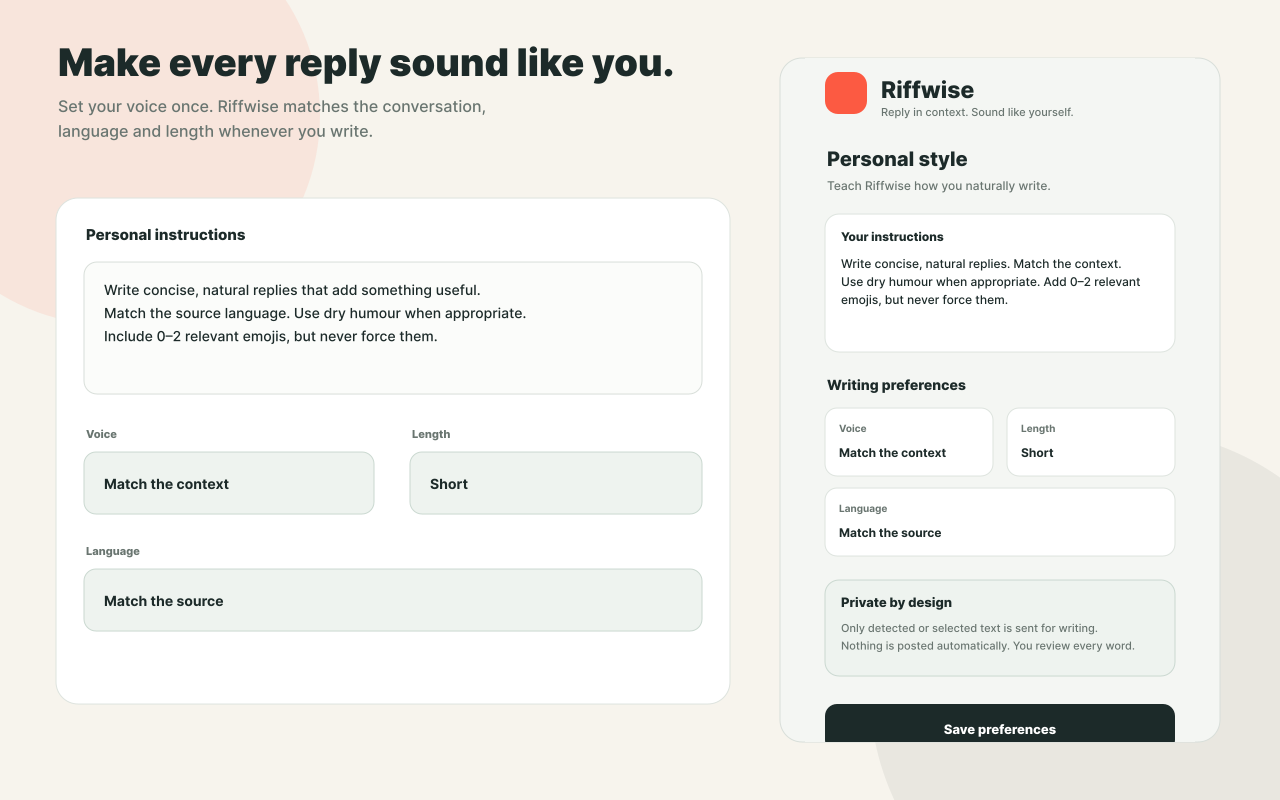
Set your preferred tone, reply length, and emoji use. Add your own writing instructions to guide each draft.
 Private by design
A writing tool, not an autopilot
Review, edit, insert—or leave it. You stay in control.
Riffwise sends only the writing-request content needed to prepare your draft. That can include selected or detected text, relevant attached media, optional nearby context, and your writing settings. It does not need your social-media passwords, does not store your Riffwise password in plaintext, never posts or sends for you, never sells your data, and does not use private conversations as training data.
Read the privacy policySimple pricing
Start with 40 successful generations each calendar month. No card required. Upgrade to Pro from Riffwise Settings after you sign in.
Start with 40 successful generations each calendar month. No card required. Upgrade to Pro from Riffwise Settings after you sign in.
Free
Pro
One generation is one reply, quote, or rewrite draft. Prices include applicable taxes where required. Paid checkout is handled securely by Paddle as merchant of record; Google is not involved in payment processing.
Common questions
Quick answers about what Riffwise does, where it works, and how your data is handled.
Riffwise is a Chrome extension that writes reply drafts for you on social media, in chats, and in email. When you’re answering a post or message, it reads the conversation and suggests a reply that sounds like you — you edit it and insert it yourself. It’s free while in beta; install the extension from the Chrome Web Store.
Directly on the sites where you already type — X, Threads and Bluesky, Gmail, and other web messaging — in desktop Chrome on Mac, Windows, and Chromebook. There’s no separate app to open, and Chrome does not run extensions on mobile.
No prompts are needed. Choose the Riffwise action in the composer, review the draft, and insert it. You can optionally set your voice, length, language, and emoji preferences once in Settings.
Never. It writes a draft and stops. Nothing is posted, sent, or scheduled unless you do it yourself.
One generation is used when Riffwise successfully returns a reply, quote, or rewrite draft. Inserting, editing, copying, sending, or publishing that draft does not use another generation. If a request fails and no usable draft is returned, the reserved generation is refunded.
Free accounts receive 40 successful generations per calendar month. A generation is used when Riffwise successfully returns a reply, quote, or rewrite draft; failed requests with no usable draft are refunded.
Open Riffwise Settings after signing in and choose Get Pro. Checkout is handled by Paddle, which shows the final price, tax, renewal, and cancellation details before you buy. You can cancel any time from Manage subscription in Settings.
Only the writing-request content needed for the draft you ask for. This can include selected or detected text, relevant attached media, optional nearby context, and your writing settings. Account credentials are handled by Supabase Authentication; Riffwise does not need your social-media passwords or store your Riffwise password in plaintext. It does not sell personal data or use private conversations as training data. See the privacy policy for details.
Say something worth reading
Add Riffwise to Chrome and try the beta.
You review every word. Nothing posts or sends automatically.